Mobile Application Penetration Testing in 2026: Using OWASP MASVS 2.1, MASWE and MASTG 2.0
Mobile application penetration testing checks the app on the device and the API behind it against OWASP MASVS, the standard that defines what secure looks like. What MASVS 2.1, MASWE and the new MASTG 2.0 cover, what testers actually find, how Android and iOS differ, and what Indian regulators expect of financial apps.
Application Security
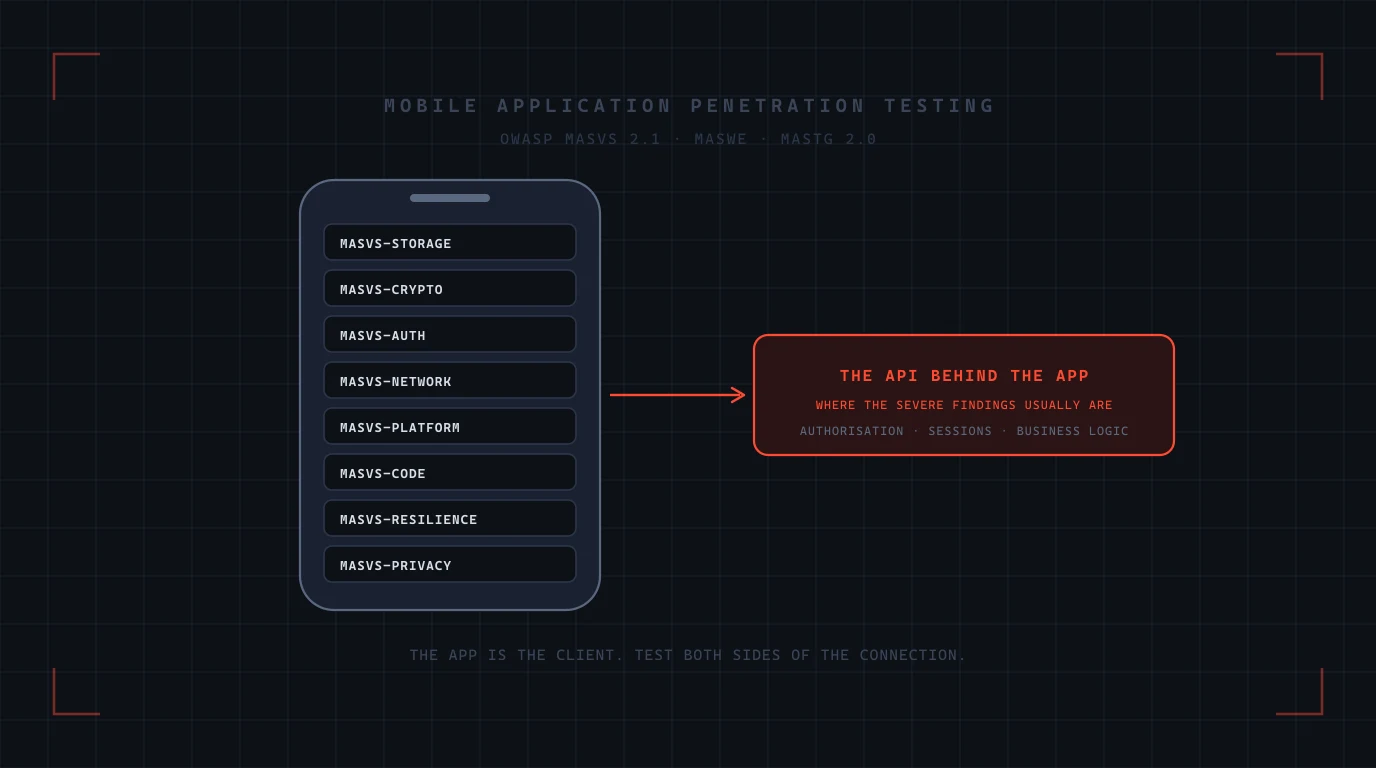
A mobile app is two things: a program running on a device you do not control, and a client for an API you do. Most mobile penetration tests concentrate on the first and most of the serious findings live in the second. OWASP's Mobile Application Security project gives both sides a shared vocabulary: MASVS says what secure looks like, MASWE lists the ways apps fail, and MASTG, which reached its first stable 2.0 release in June 2026, says how to test for each one. Here is how a mobile penetration test works against those standards, what it finds on Android and iOS, and what Indian regulators now expect of financial apps.
In short. Test against OWASP MASVS 2.1, choose the depth from the MAS profiles in MASTG based on what the app protects, and put the backend API in scope, because authorisation and session flaws on the server are where attackers get other people's data. On the device, expect findings in local storage, network trust, platform interactions such as WebViews and deep links, and resistance to tampering. Assume the app will be reverse engineered and run on a rooted or jailbroken device, and design so that none of that matters: the server enforces the rules, the device attests to the server, and secrets never ship in the binary.
The OWASP MAS standards, and what changed in 2026
The project has three layers, and they fit together in a specific way.
| Document | Current version | What it is for |
|---|---|---|
| MASVS, the verification standard | 2.1.0, January 2024 | The requirements: eight control groups that define what a secure app does. Short enough to read in an afternoon |
| MASWE, the weakness enumeration | 1.0.0, August 2026 | 78 common security and privacy weaknesses, MASWE-0001 to MASWE-0078, described by the project as "the bridge between the OWASP MASVS and the MASTG" |
| MASTG, the testing guide | 2.0.0, June 2026 | How to test: 193 tests, 167 techniques, 135 tools, 72 best practices and 152 demos, each with its own identifier and cross-linked to the weakness and control it covers |
Two changes matter if your last test was scoped against older material. First, the verification levels no longer live in MASVS. Since version 2.0, the L1, L2 and R profiles are defined in MASTG as MAS profiles, and the project says that applying them "should be a risk-based decision". Second, the downloadable MAS checklists were withdrawn in July 2026 when MASTG 2.0 made them redundant; the mapping from control to weakness to test now lives in MASTG itself. A proposal that still quotes "MASVS L1 checklist" is quoting something that no longer exists.
The eight MASVS control groups
| Group | What it requires | What a test looks at |
|---|---|---|
| MASVS-STORAGE | Sensitive data the app intentionally stores is properly protected | Databases, preferences, caches, logs, backups, screenshots, the clipboard, and what the keychain or keystore actually holds |
| MASVS-CRYPTO | Cryptography follows current best practice, including key management | Hard-coded keys, weak algorithms and modes, keys stored outside hardware-backed storage, home-made schemes |
| MASVS-AUTH | Authentication and authorisation are implemented securely | Session handling, token lifetime, biometric unlock that gates nothing server-side, step-up for sensitive actions |
| MASVS-NETWORK | Secure connections under any circumstances | TLS configuration, certificate validation, pinning and its bypass, cleartext fallbacks, third-party SDK traffic |
| MASVS-PLATFORM | Interactions with the mobile platform occur securely | Exported components, intents and deep links, WebView settings and JavaScript bridges, inter-process communication, data shown on screen |
| MASVS-CODE | Vulnerabilities from external data entry points are handled; the app is kept updated | Input validation, injection through platform channels, outdated dependencies and SDKs, debug features left on |
| MASVS-RESILIENCE | Defence in depth: obfuscation, anti-debugging, anti-tampering, runtime protection | How long it takes to repackage, hook or run the app on a rooted device, and whether the backend notices |
| MASVS-PRIVACY | A baseline for user privacy | Data collected versus declared, permissions requested versus needed, third-party SDK behaviour, tracking |
The OWASP Mobile Top 10 for 2024 lists the same ground from the attacker's side: improper credential usage, inadequate supply chain security, insecure authentication and authorisation, insufficient input and output validation, insecure communication, inadequate privacy controls, insufficient binary protections, security misconfiguration, insecure data storage and insufficient cryptography.
Choosing the depth: MAS profiles
The profiles are a scoping tool, not a grade.
- L1 is the baseline every app should meet: the standard controls, tested in the standard way.
- L2 adds defence in depth for apps that handle sensitive data: banking, lending, health, identity. It assumes a more capable attacker and tests more thoroughly.
- R is the resilience profile, for apps where tampering itself is the threat, such as payment, gaming and apps that embed proprietary logic. It can be combined with L1 or L2.
A useful external reference point: the App Defense Alliance's MASA assessment, which we have covered in our MASA guide, validates apps against a set of MASVS Level 1 requirements. That is a floor for publication, not a substitute for an L2 test of a lending or payment app. Adayptus is not an ADA-authorised laboratory, so a MASA validation itself must come from one of the alliance's authorised labs; what we test is the same standard, at the depth your risk needs.
What the backend has to do with it
The highest-severity findings in mobile engagements are usually not on the device at all. They are in the API the app calls: an endpoint that returns another customer's loan statement when the identifier in the request is changed, a session token that never expires, a limit enforced by the app's screen but not by the server, an administrative function reachable with a customer's token. The app is simply the most convenient client for finding them, because every request it makes can be captured and replayed.
Apple's guidance on app integrity says it directly: "You can't rely on your app's logic to perform security checks on itself because a compromised app can falsify the results." The same is true of business rules. CERT-In's recent advisories on attacks against lenders describe attackers calling disbursement APIs directly, bypassing "application-level controls such as loan creation, KYC, sanction, beneficiary verification, balance sufficiency and per-transaction limits", and modified app packages making API calls. A mobile test that stops at the device would have passed those apps.
For that reason our mobile application penetration testing always includes the API the app talks to, tested with the methodology in our guide to testing API authorisation, and we recommend API penetration testing as a standalone exercise where several clients share one backend.
Android: what testers check and what the platform now provides
| Area | Common finding | Platform facts that matter |
|---|---|---|
| Network trust | Pinning missing, or implemented in code that is trivially hooked; cleartext allowed for specific domains | Network Security Configuration supports pin sets of SHA-256 public key hashes with a backup pin; apps targeting API 24 and above trust only system certificate authorities by default; cleartext is off by default from API 28; debug trust overrides apply only when the app is debuggable |
| Local storage and backups | Tokens and personal data in shared preferences or SQLite without encryption; backups allowed | android:allowBackup defaults to true; for apps targeting API 31 and above, device-to-device migration cannot be disabled on some manufacturers' devices even with allowBackup false, so android:dataExtractionRules is required |
| Integrity | Root detection in app code that is bypassed with a hook; attestation result trusted by the app instead of the server | SafetyNet Attestation was fully turned down on 31 January 2025; Play Integrity returns device, app and account verdicts that the server should verify, not the app |
| Platform interactions | Exported activities and content providers; WebViews with JavaScript bridges exposed to untrusted content; deep links that trigger actions without confirmation | Android 16 adds opt-in safer intent matching; Android 15 introduced Private Space and redacts one-time passcodes from untrusted notification listeners; restricted settings since Android 13 limit what sideloaded apps can enable |
| Secrets in the binary | API keys, signing secrets and third-party credentials in resources or code | Since August 2021 new Play apps ship as App Bundles; the APKs they produce decompile as easily as ever |
| Store requirements | Target SDK out of date; Data safety form does not match what the app and its SDKs do | From 31 August 2026 new apps and updates must target Android 16 (API 36); the Data safety section has been mandatory since July 2022 and covers third-party SDKs |
iOS: what testers check
| Area | Common finding | Platform facts that matter |
|---|---|---|
| Network trust | App Transport Security exceptions that allow arbitrary loads; pinning absent | ATS is on by default and requires TLS 1.2 or later with forward secrecy; exceptions such as NSAllowsArbitraryLoads show up in the Info.plist and in review |
| Keychain | Items stored with the default accessibility, available after first unlock and migrated in backups | Accessibility classes run from WhenPasscodeSetThisDeviceOnly, the most restrictive, to AfterFirstUnlock; ThisDeviceOnly items are not migrated to other devices' backups |
| Integrity | Jailbreak detection in app logic; no attestation | App Attest, available since iOS 14, uses a hardware-backed key in the Secure Enclave to certify that a request comes from a valid instance of the app, verified on your server |
| Platform interactions | URL schemes and universal links that accept untrusted parameters; WebView content from untrusted origins; sensitive screens visible in the app switcher | Lockdown Mode, which Apple describes as "optional, extreme protection" for a very few users, changes what some apps can do and should be tested as a configuration |
| Privacy | Required-reason APIs used without declared reasons; tracking domains undeclared | Privacy manifests with declared data types, tracking domains and API reasons have been required for new and updated apps since May 2024 |
On jailbreaking: for recent iPhones and iOS versions there is no publicly available, stable jailbreak, so testers work with older devices, research tools and instrumentation of the app itself. That is not a reason to skip resilience testing. The attacker who matters is not a curious user with a jailbroken phone; it is someone who repackages your app, hooks its functions and talks to your API with a modified client.
Third-party SDKs: the code you did not write
A NowSecure survey of 485 North American security leaders published in June 2026 found that 68% said more than half of their apps' code is third-party SDKs, and only 49% always assess those SDKs before release. A Guardsquare survey of 1,360 developers and security leaders in January 2026 found 72% had experienced at least one mobile app security incident in the previous year. Each SDK brings its own network traffic, permissions, data collection and vulnerabilities, and the store declarations you sign cover all of it. A mobile test should inventory the SDKs, watch what they send, and compare it with the Data safety form and privacy manifest. Our guide to software bills of materials covers how to keep that inventory current.
What Indian regulators expect of financial apps
- RBI Digital Lending Directions, 2025. Lending apps must "desist from accessing mobile phone resources like file and media, contact list, call logs"; one-time access to camera, microphone and location is allowed only for onboarding and KYC with explicit consent; no biometric data may be stored; all data "is stored only in servers located within India"; and the lender is "fully responsible and liable for all acts and omissions" of its lending service providers. A test of a lending app checks every one of these against what the app actually does.
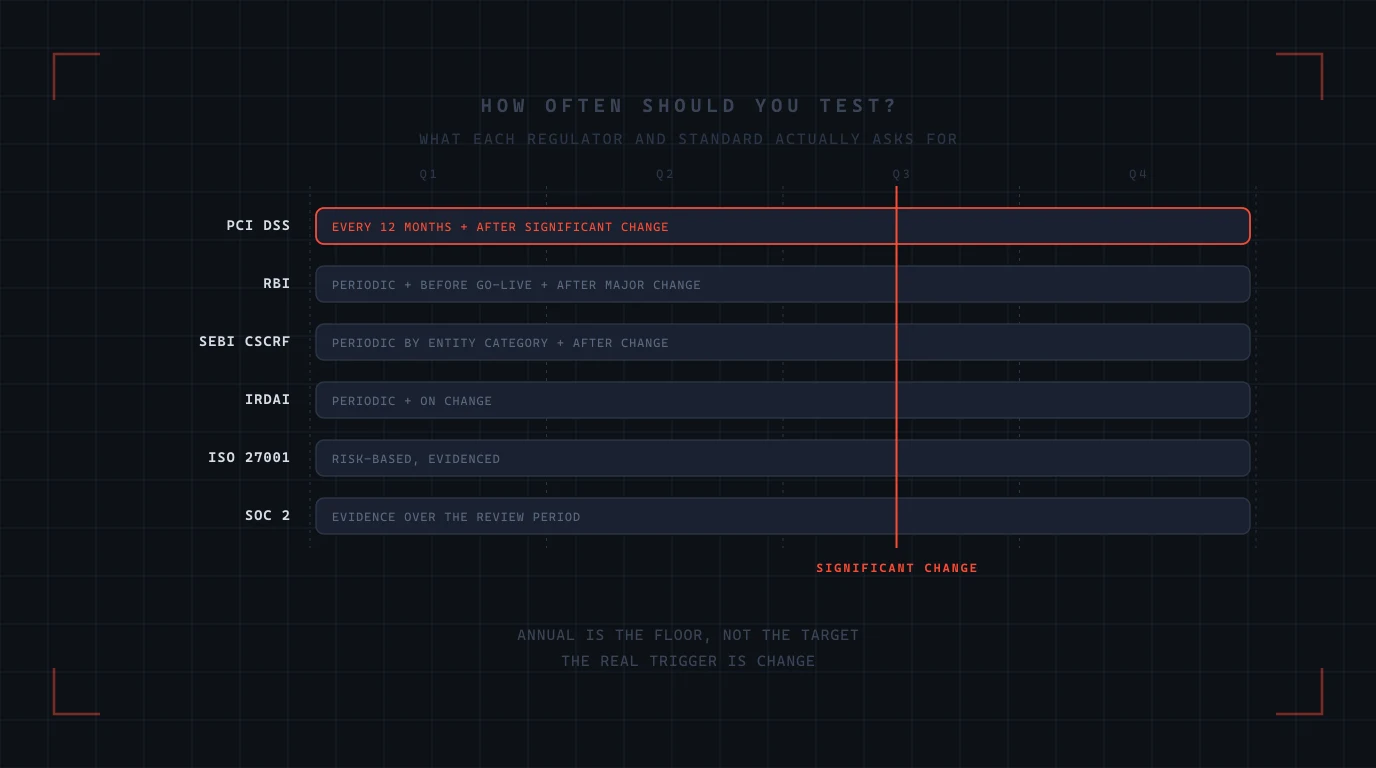
- RBI 2026 cybersecurity directions. Vulnerability assessment at least every six months and penetration testing at least every twelve for critical and customer-facing systems, for banks and NBFCs in the middle layer and above, with testing through the lifecycle including after changes. The NBFC directions also require safeguarding of information assets used by mobile applications with end-to-end encryption. Our guide to the NBFC directions has the detail.
- NPCI. The UPI information security compliance framework requires a security audit of the UPI application, front end and back end, before onboarding and annually thereafter, conducted by a CERT-In empanelled auditor, with an annual compliance report.
- SEBI. The CSCRF's VAPT scope explicitly includes mobile applications, and its report format lists the APK and IPA files tested.
- Google Play. In India, personal loan apps may publish only if they submit their RBI licence or appear on RBI's list of digital lending apps deployed by regulated entities, and platform apps must disclose the names of every lender they serve.
How a mobile penetration test runs
Step 1 — Scope and profile
Platforms, app versions, user roles, the backend endpoints in scope, and the MAS profile, chosen from what the app protects. Test accounts for every role.
Step 2 — Static analysis
Decompile and inspect the binary: manifests and entitlements, exported components, network configuration, embedded secrets, SDK inventory, cryptography. Tools such as MobSF, jadx and apktool speed this up; the findings that matter still need a person.
Step 3 — Dynamic analysis
Run the app on real devices and instrumented ones, intercept every request with a proxy, hook functions with Frida and objection, bypass pinning and root or jailbreak detection, and watch what the app stores, logs and sends.
Step 4 — API testing
Replay and modify captured requests: other users' identifiers, other roles' functions, expired and swapped tokens, business rules enforced only by the app, rate limits, and anything the app never calls but the server still exposes.
Step 5 — Resilience, where in scope
Repackage, re-sign and run the app; hook its protections; measure how long each takes and whether the server detects a modified client.
Step 6 — Report and retest
Findings mapped to MASVS controls and MASWE weaknesses, with the MASTG test that found each, the fix, and a retest before the next release.
Building it in: what to do before the test
- Enforce everything on the server. Authorisation, limits, workflow order, and verification of attestation results. Treat the app as untrusted, because CERT-In's advice to lenders now says exactly that.
- Attest, do not self-check. Use Play Integrity and App Attest with server-side verification, and decide in advance what the server does with a failing verdict.
- Pin through configuration, with a backup key. Network Security Configuration on Android, and a plan for certificate rotation that does not brick the app.
- Keep secrets out of the binary. Anything in the app is public. Short-lived tokens issued after authentication replace embedded keys.
- Store the minimum. Hardware-backed keystore or keychain with the most restrictive class that still works, no sensitive data in logs or screenshots, and explicit backup rules.
- Know your SDKs. An inventory, a review before adding one, and declarations that match reality.
- Test every release that changes the API or the authentication flow, not only once a year. Our secure coding guide covers the habits that make this cheaper.
Frequently Asked Questions
Click any question to expand the answer.
QWhat is mobile application penetration testing?
An authorised test of a mobile app and the API behind it, from an attacker's position. On the device it covers storage, cryptography, authentication, network trust, platform interactions, code quality, resilience and privacy; on the server it covers authorisation, sessions and business rules. The OWASP Mobile Application Security standards, MASVS, MASWE and MASTG, define what is tested and how.
QWhat is OWASP MASVS?
The Mobile Application Security Verification Standard, currently version 2.1.0 from January 2024. It defines eight control groups: STORAGE, CRYPTO, AUTH, NETWORK, PLATFORM, CODE, RESILIENCE and PRIVACY. It is the requirements document; MASTG describes how to test against it.
QWhat is OWASP MASTG 2.0?
The Mobile Application Security Testing Guide, whose first stable 2.0 release came in June 2026. It restructures the guide into individually identified tests, techniques, tools, best practices and demos, each cross-linked to the MASVS control and MASWE weakness it covers, with 193 tests in the 2.0.0 release.
QWhat is MASWE?
The Mobile Application Security Weakness Enumeration, released as version 1.0.0 in August 2026 with 78 weaknesses. OWASP describes it as the bridge between MASVS, which says what secure looks like, and MASTG, which says how to test.
QWhat are MASVS levels L1, L2 and R?
Since MASVS 2.0 the levels are defined in MASTG as MAS profiles rather than in MASVS itself. L1 is the baseline for every app, L2 adds defence in depth for apps handling sensitive data, and R is the resilience profile for apps where tampering is itself a threat. OWASP says applying them should be a risk-based decision.
QDoes a mobile penetration test include the backend API?
It should. The highest-severity findings in mobile engagements are usually server-side authorisation, session and business-rule flaws, reached through requests captured from the app. A test that stops at the device misses them.
QHow do you test certificate pinning?
By attempting to bypass it: intercepting traffic with a proxy and hooking the app's networking with instrumentation tools. The test checks whether pinning exists, whether it is implemented through platform configuration with a backup pin, and whether the app falls back to cleartext or accepts user-installed certificates.
QIs root or jailbreak detection enough?
No. Detection inside the app can be hooked or patched. The platform attestation services, Play Integrity on Android and App Attest on iOS, give the server a verifiable signal about the device and the app instance; the server, not the app, should decide what to do with it.
QWhat happened to SafetyNet Attestation?
Google fully turned down the SafetyNet Attestation API on 31 January 2025. Its replacement is the Play Integrity API, which returns device, app and account verdicts that should be verified on the server.
QWhat do Indian regulators require for mobile app security testing?
RBI's 2026 cybersecurity directions require vulnerability assessment every six months and penetration testing every twelve for critical and customer-facing systems at banks and middle-layer-and-above NBFCs; the Digital Lending Directions, 2025 restrict what lending apps may access and store; NPCI requires a security audit of UPI applications before onboarding and annually; and SEBI's CSCRF includes mobile applications in its VAPT scope.
QWhat are the most common findings in mobile penetration tests?
On the device: sensitive data in unencrypted storage or backups, weak or bypassable pinning, secrets in the binary, exported components and WebView bridges exposed to untrusted content, and resilience controls that are easy to hook. On the server: authorisation flaws that expose other users' data and business rules enforced only by the app.
QHow often should a mobile app be penetration tested?
At least annually, and whenever a release changes the API, the authentication flow, or the SDKs the app includes. Regulated financial apps in India have fixed cadences set by RBI, NPCI and SEBI.
Related reading
For the App Defense Alliance's mobile assessment, see MASA: independent security testing for mobile apps. For the backend, testing BOLA, BFLA and property-level authorisation. For the attack this testing defends against, CERT-In's Crafty Falcon advisory. For the wider testing landscape, the complete guide to application security testing.
Sources
- OWASP, Mobile Application Security Verification Standard (MASVS).
- OWASP, Using the MASVS and MAS profiles.
- OWASP, MASTG v2.0.0 release notes.
- OWASP, MASWE releases.
- OWASP, MASTG v2.0.0 removes MAS checklists.
- OWASP, Mobile Top 10 2024.
- Google, SafetyNet Attestation API turndown.
- Android Developers, Play Integrity API overview.
- Android Developers, Network security configuration.
- Android Developers, The application element: allowBackup and dataExtractionRules.
- Android Developers, Target API level requirements for Google Play apps.
- Android Developers, Android 16 behavior changes.
- Apple Developer, Establishing your app's integrity (App Attest).
- Apple Developer, Preventing insecure network connections (App Transport Security).
- Apple Developer, Keychain item attribute keys and values.
- Apple Developer, Privacy manifests and required reason APIs.
- Guardsquare, Mobile app security incident research (January 2026).
- NowSecure, 2026 Mobile App Risk Management Survey.
- Reserve Bank of India, Digital Lending Directions, 2025.
- Reserve Bank of India, NBFC – Cybersecurity, Technology: Risk, Resilience and Assurance Framework Directions, 2026.
- KPMG, UPI information security compliance framework 2025 (summary).
- Google Play, Personal loans policy: India requirements.
- App Defense Alliance, Mobile Application Security Assessment (MASA).
Adayptus Consulting
Application Security, Adayptus
Adayptus Consulting Private Limited is a cybersecurity consultancy based in Noida, India, testing Android and iOS applications and the APIs behind them against the OWASP Mobile Application Security standard.
On This Page
- The OWASP MAS standards, and what changed in 2026
- The eight MASVS control groups
- Choosing the depth: MAS profiles
- What the backend has to do with it
- Android: what testers check and what the platform now provides
- iOS: what testers check
- Third-party SDKs: the code you did not write
- What Indian regulators expect of financial apps
- How a mobile penetration test runs
- Building it in: what to do before the test
- Frequently Asked Questions
- Related reading
- Sources