Infrastructure as Code Security: Scanning Terraform and CloudFormation, and the Drift Scanners Miss
Infrastructure as code is the cheapest place to stop a cloud misconfiguration, but scanning only sees what is in the code. Where to scan, what to block, how to protect state and the pipeline, and how to catch drift and unmanaged resources.
Cloud & DevSecOps
Infrastructure as code moved cloud configuration into files that can be reviewed and scanned before anything is built. That makes it the cheapest place to stop a public storage bucket or an open admin port. It also creates two blind spots that scanning alone does not cover: changes made outside the code after deployment, and resources that were never in the code at all. Here is how to secure Terraform and CloudFormation end to end, including the parts scanners miss.
In short. Scan infrastructure code in the pull request and again on the resolved plan before it is applied, and block on the few findings you have agreed are never acceptable. Protect the state file, which can hold secrets in plain text, and the pipeline, which holds the most powerful credentials in your cloud. Check regularly for drift between code and reality. And remember that drift detection only sees resources the code manages; anything created by hand needs posture management to find it.
What IaC scanning catches
The misconfigurations behind most cloud incidents are visible in the code that creates them. Static scanners read Terraform, CloudFormation, Kubernetes manifests and similar files, and flag settings that break a policy before any resource exists.
| Misconfiguration | What it looks like in code | Why it matters |
|---|---|---|
| Public storage | A bucket or container with public access allowed or block-public-access settings disabled | The most common cause of cloud data exposure |
| Open administrative ports | A security group or network rule allowing SSH, RDP or database ports from anywhere | Direct exposure of management interfaces to the internet |
| Wildcard permissions | IAM policies granting all actions or all resources | One leaked credential reaches everything |
| Encryption off | Storage, databases or volumes created without encryption at rest | Often a direct compliance failure |
| Logging off | Access logging, flow logs or audit trails not enabled | An incident you cannot investigate |
| Public databases | A managed database marked publicly accessible | Data one password away from the internet |
| Secrets in code | Passwords, keys or tokens in variable defaults or tfvars files | Credentials committed to version control forever |
Where to scan
Scanning once in a nightly job finds problems after they are deployed. Scanning at the points where a change is still cheap to fix finds them before.
In the editor and before commit
Fast feedback for the engineer writing the change, and a pre-commit check for secrets so they never reach the repository. Advisory, not blocking.
In the pull request
Findings posted as review comments on the lines that cause them, where a reviewer will see them alongside the change.
On the plan, before apply
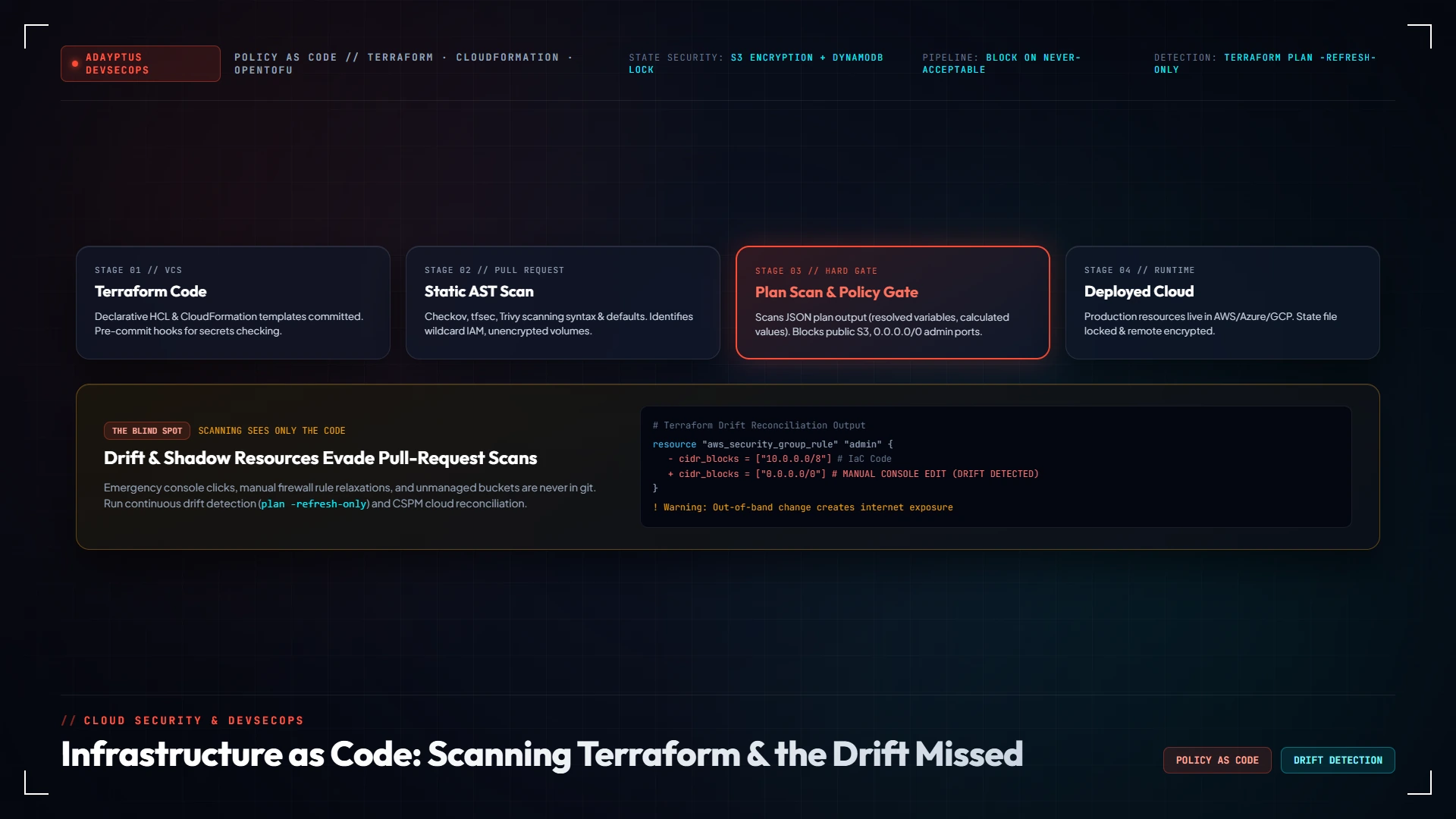
Source code alone does not show final values: modules, variables and conditionals resolve at plan time. Scanning the generated plan catches settings the source scan could not see, and is the right place for a blocking gate.
In the running cloud
Posture management and the provider's own policy services check what actually exists. This is the only layer that sees drift and resources created by hand.
Open source scanners such as Checkov, KICS and Trivy cover Terraform, CloudFormation and Kubernetes. If you used tfsec, note that Aqua Security folded it into Trivy in 2023 and new checks are now developed there. Cloud-native policy services such as AWS Config rules and Azure Policy enforce the same rules in the running environment. Which tool matters less than blocking on an agreed set of rules and keeping exceptions honest.
Decide what blocks
A scanner that blocks on everything gets bypassed within a week. Start with a short list of findings that are never acceptable in production, block only on those, and report the rest. A reasonable first list is: public storage, administrative ports open to the internet, wildcard IAM policies, unencrypted data stores and disabled audit logging. Add to it as the noise falls.
Some findings will be legitimate exceptions: a public bucket that serves a website, for example. Record the exception in the code next to the resource, with the reason, an owner and a review date, so it is visible in review and does not silently apply to the next bucket someone creates.
Protect the state file
Terraform's own documentation is direct about this: state and plan files "contain detailed information about your infrastructure, including resource attributes and metadata that can contain sensitive values, such as initial database passwords or API tokens", and when working locally Terraform stores state "in a plaintext file, which includes any secret values you defined in your configuration".
HashiCorp's recommendations are to store state remotely, encrypt it at rest, restrict who can read it, and audit access to it. In practice that means a remote backend with encryption enabled, access limited to the pipeline and a small number of administrators, no state files on laptops or in repositories, and an alert when someone outside that group reads it. Anyone who can read your state may be able to read your secrets.
Protect the pipeline
The pipeline that applies infrastructure code usually has permission to create, change and delete almost anything. That makes it one of the most valuable targets in your cloud, and it deserves the same care as a production administrator account.
- No long-lived cloud keys in the CI system. Use short-lived credentials issued per run through the provider's identity federation.
- Separate plan from apply. The plan step needs read access; only the apply step needs write access, and only after approval.
- Protect the branch that deploys. Required reviews, no direct pushes, and no way for a pull request from a fork to run with production credentials.
- Pin what you pull in. Modules and providers at fixed versions from sources you trust, because a compromised module runs with the pipeline's permissions.
A CI/CD security review covers these controls, and our article on software bills of materials covers the dependency side.
Drift: when reality stops matching the code
Drift happens when someone changes a resource outside the code: a console edit during an incident, a script from another team, an emergency firewall rule that was never written back. The code still describes a safe configuration; the cloud no longer matches it. HashiCorp's guidance is plain: you "should not make manual changes to resources controlled by Terraform, because the state file will be out of sync". In practice people do, so you need to detect it.
| Terraform | AWS CloudFormation | |
|---|---|---|
| How to detect | terraform plan -refresh-only compares state with real infrastructure and shows the differences without changing anything | Drift detection on a stack or resource compares actual property values with the template |
| Statuses | The plan lists what changed outside Terraform | IN_SYNC, MODIFIED, DELETED or NOT_CHECKED per resource |
| Limits to know | Only sees resources in that state file | Only checks properties explicitly set in the template, not defaults; nested stacks are checked separately; resource types without support show NOT_CHECKED |
When drift is found there are only two honest outcomes. Either the change was wrong, and you re-apply the code to put the resource back; or the change was right, and you update the code so it describes the new reality. What you should not do is accept the change into state and move on without deciding, because the next apply may silently revert an emergency fix or the drift may hide an attacker's change.
The gap drift detection cannot see
Drift detection compares managed resources with their definitions. A resource that was created by hand, by another tool or by an attacker is not in any state file or stack, so it is not drift. It is simply invisible to the IaC workflow: a test database someone spun up in the console, an access key created during an incident, a storage bucket made for a one-off data transfer.
Finding those needs an inventory of what actually exists, compared with what the code manages. That is the job of cloud security posture management, and of preventive guardrails at the account level that stop the riskiest resources being created outside the pipeline at all. Our explainer on CSPM, CWPP and CNAPP sets out where each fits.
A rollout plan
Step 1 — Baseline
Run a scanner across all infrastructure code in report-only mode and a posture assessment across the live accounts. Compare the two to see how much of the cloud is actually managed as code.
Step 2 — Secure state and secrets
Move state to an encrypted remote backend with restricted access, and scan repository history for secrets that were committed in the past. Rotate anything found.
Step 3 — Gate on the short list
Turn on blocking for the never-acceptable findings at the plan stage. Keep everything else advisory.
Step 4 — Lock down the pipeline
Short-lived credentials, separate plan and apply roles, approval before apply, protected branches.
Step 5 — Schedule drift checks and close the unmanaged gap
Run drift detection on a schedule with alerts to the owning team, and use posture management to find resources outside the code. Bring the important ones under management.
Frequently Asked Questions
Click any question to expand the answer.
QWhat is IaC security scanning?
Static analysis of infrastructure code such as Terraform, CloudFormation and Kubernetes manifests to find misconfigurations, such as public storage, open administrative ports, wildcard permissions or disabled encryption, before the resources are created.
QShould we scan the source code or the plan?
Both. Scan source in the pull request for fast feedback, and scan the resolved plan before apply, because modules, variables and conditionals only produce final values at plan time. The plan stage is the right place for a blocking gate.
QIs Terraform state sensitive?
Yes. HashiCorp's documentation says state and plan files can contain sensitive values such as initial database passwords or API tokens, and that local state is stored in plain text. Store it remotely, encrypt it at rest, restrict access and audit who reads it.
QWhat is configuration drift?
A difference between what the infrastructure code describes and what actually exists, usually caused by changes made outside the code, such as a console edit during an incident. The code may describe a safe configuration while the real resource no longer matches it.
QHow do we detect drift in Terraform?
Run terraform plan -refresh-only, which compares the state file with real infrastructure and shows the differences without changing anything. Then decide for each change whether to re-apply the code or update the code to match.
QDoes CloudFormation drift detection check everything?
No. AWS documents that it only checks property values explicitly set in the template, not defaults; nested stacks must be checked separately; and resource types without drift support are reported as NOT_CHECKED. Set the properties that matter explicitly, even to their default values.
QWill drift detection find resources created in the console?
No. Drift detection only compares resources that the code manages. A resource created by hand is not in any state file or stack, so it is invisible to the IaC workflow. Cloud security posture management and account-level guardrails are needed to find and prevent unmanaged resources.
QWhat happened to tfsec?
Aqua Security, which acquired tfsec in 2021, folded it into Trivy in 2023. New misconfiguration checks are developed in Trivy, which scans Terraform, CloudFormation, Kubernetes manifests and more.
QWhich findings should block a deployment?
Start with a short list that is never acceptable in production, such as public storage, administrative ports open to the internet, wildcard IAM policies, unencrypted data stores and disabled audit logging. Block only on those at first and report everything else.
QHow do we secure the deployment pipeline?
Use short-lived credentials issued per run instead of long-lived cloud keys, separate read-only plan permissions from write permissions used to apply, require approval before apply, protect the deploying branch and pin module and provider versions.
Related reading
For the misconfigurations these controls prevent, see the most common cloud security misconfigurations. For building infrastructure as code into a migration from the start, cloud migration security: the decisions to make before the first workload moves. For containers and clusters, Kubernetes and container security best practices.
About Adayptus
Adayptus Consulting Private Limited is a cybersecurity consultancy based in Noida, India. We review cloud configurations through read-only access, test them the way an attacker would, and deliver fixes as code so they stay fixed.
What we can do for you:
- IaC security. Infrastructure as code security: scanner selection and tuning, the blocking rule set, exceptions process and state protection, built into your existing pipeline.
- The pipeline and toolchain. DevSecOps for cloud, a CI/CD security review and DevSecOps toolchain optimisation so the controls run without slowing delivery.
- What actually exists. Posture management and a cloud security assessment against the CIS benchmark for your provider, to find drift and the resources nobody wrote down.
Sources
- HashiCorp, Sensitive data in state.
- HashiCorp, Manage resource drift.
- AWS, Detect unmanaged configuration changes to stacks and resources with drift detection.
- Aqua Security, tfsec is now part of Trivy.
Adayptus Consulting
Cloud and DevSecOps Security, Adayptus
Adayptus Consulting Private Limited is a cybersecurity consultancy based in Noida, India, reviewing cloud configurations through read-only access and delivering fixes as code.